
Prove your Copilot ROI. Govern every agent.
Copilot Insights shows exactly which Microsoft 365 Copilot licences are paying off, reclaims the ones that aren't, and gives you a governed inventory of every AI agent in your tenant — read-only, in minutes.
Read-only · activity metadata only · never prompt content
Your Copilot investment, finally accountable
Microsoft 365 Copilot is one of the most expensive licences you'll buy. Copilot Insights makes sure every seat earns its keep — and that the agents built on top of it stay under control.
Stop paying for unused Copilot
Instantly see purchased vs assigned vs actually-active licences, and the exact monthly spend you can reclaim from dormant seats.
See real adoption
Understand who is using Microsoft 365 Copilot, in which apps, and where adoption is stalling — so you can act, not guess.
Govern every AI agent
Get a live inventory of every Copilot Studio agent in your tenant, and flag the unused, orphaned and sensitive ones.
Safe by design
Read-only and activity-metadata only — Copilot Insights never reads prompt content. Security teams sign off in a day, not a quarter.
Two modules. One dashboard.
Licence ROI and agent governance, side by side — so the team that pays for Copilot and the team that secures it are finally looking at the same numbers.
Copilot licence ROI
Turn raw Microsoft 365 licence data into a clear ROI story and a reclaim number you can take to finance.
- Purchased vs assigned vs active licences at a glance
- Reclaimable spend surfaced in $/month and $/year
- Adoption by app, with dormant & low-usage users
- Prioritised recommendations you can act on
- Full report export to CSV & PDF
AI agent governance
Discover and govern every Copilot Studio agent in your tenant — no more shadow agents or mystery ownership.
- Automatic inventory of Copilot Studio & PVA agents
- Published, unused and orphaned agents flagged
- Agents touching sensitive data highlighted
- Ownership and status in one place
- A governance baseline you can track over time
What you get on top of Microsoft’s own dashboards
The Microsoft 365 admin center and the Copilot Dashboard give you the data. Copilot Insights turns it into recovered spend, clear actions and agent governance — it complements Microsoft’s tools, it doesn’t replace them.
| Capability | Microsoft 365 admin center & Copilot Dashboard | Copilot Insights |
|---|---|---|
| Copilot licence assignment & the usage report | ||
| Reclaimable spend surfaced as a £/$ figure | – | |
| Prioritised reclaim & renewal right-sizing | – | |
| Copilot Studio agent inventory with risk flags | Partial | |
| Licence ROI + agent governance in one view | – | |
| Board-ready ROI reports, CSV & PDF export | Partial | |
| Multi-tenant / MSP view across clients | – |
Keep using Microsoft’s native tools — Copilot Insights is the action layer on top. ( built in · ~ partial · – not covered)
See Copilot Insights in action
From the overview dashboard to multi-tenant governance — a closer look at each screen. Click any screenshot to view it full-screen.
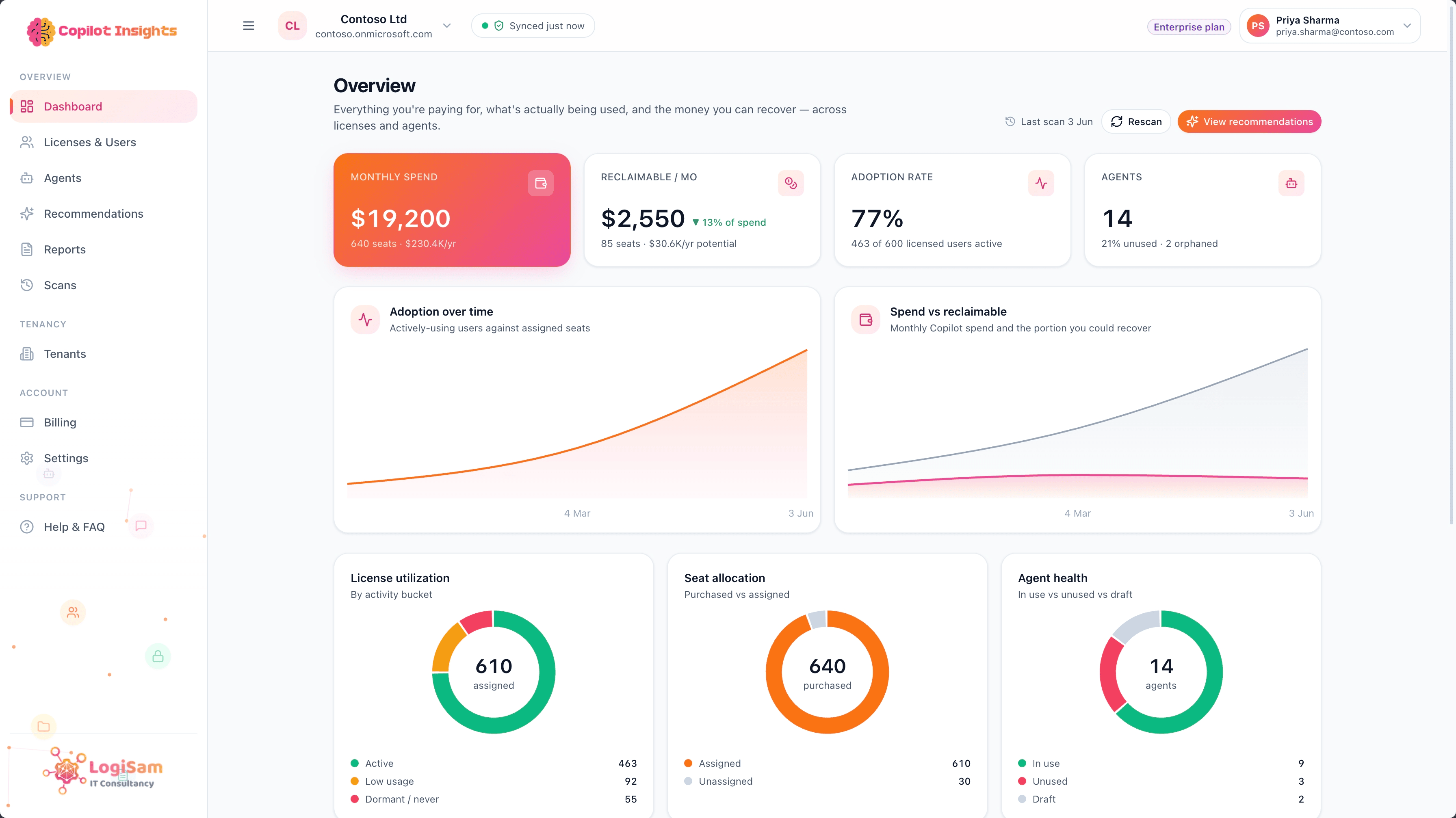
Overview dashboard
Your whole Copilot estate at a glance — reclaimable spend, adoption and the top opportunities to act on. It's the first thing you see after every scan.
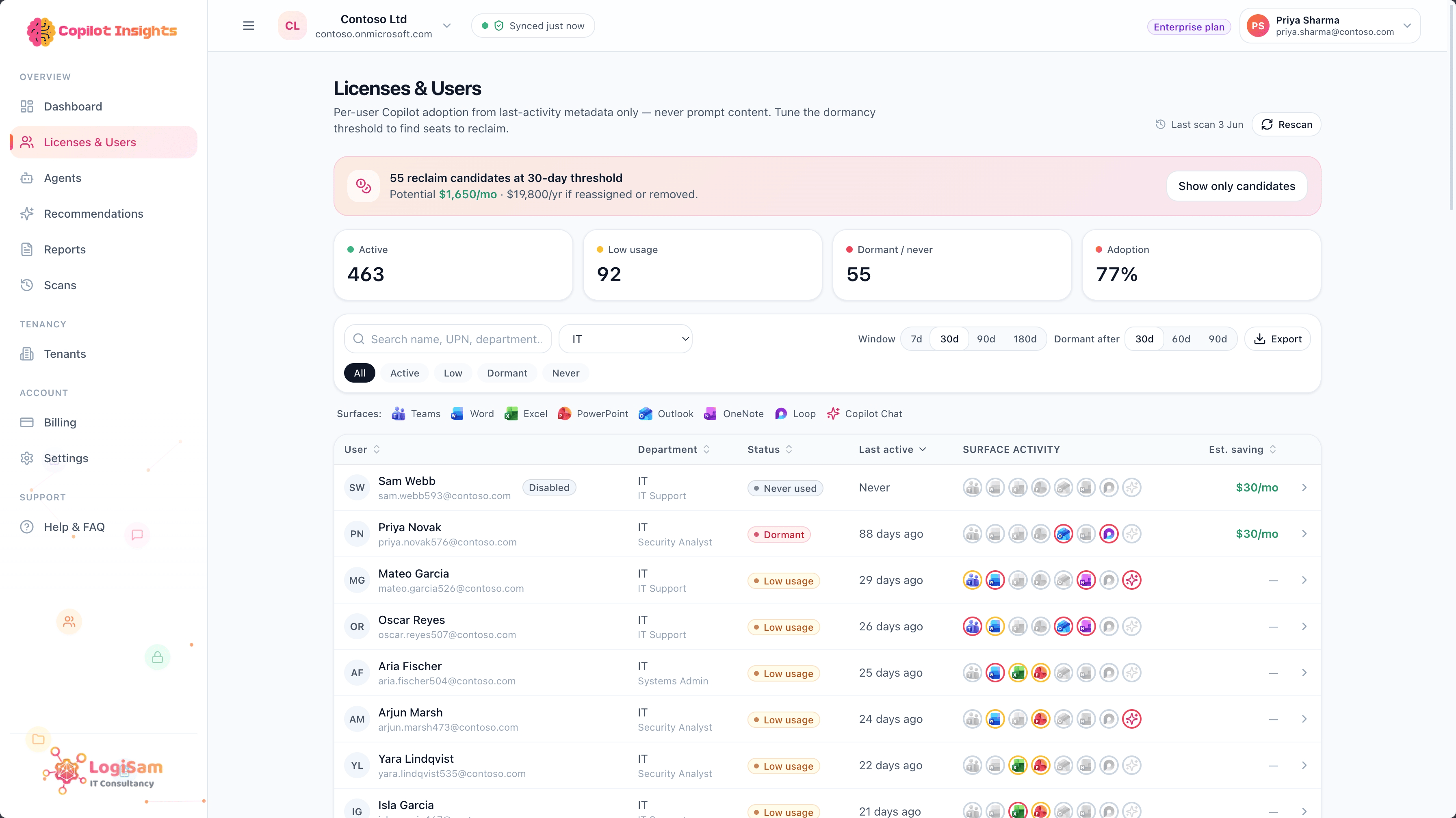
Copilot licence ROI
See purchased vs assigned vs actively-used seats, and the exact spend you can reclaim from dormant and unassigned licences — in $/month and $/year.
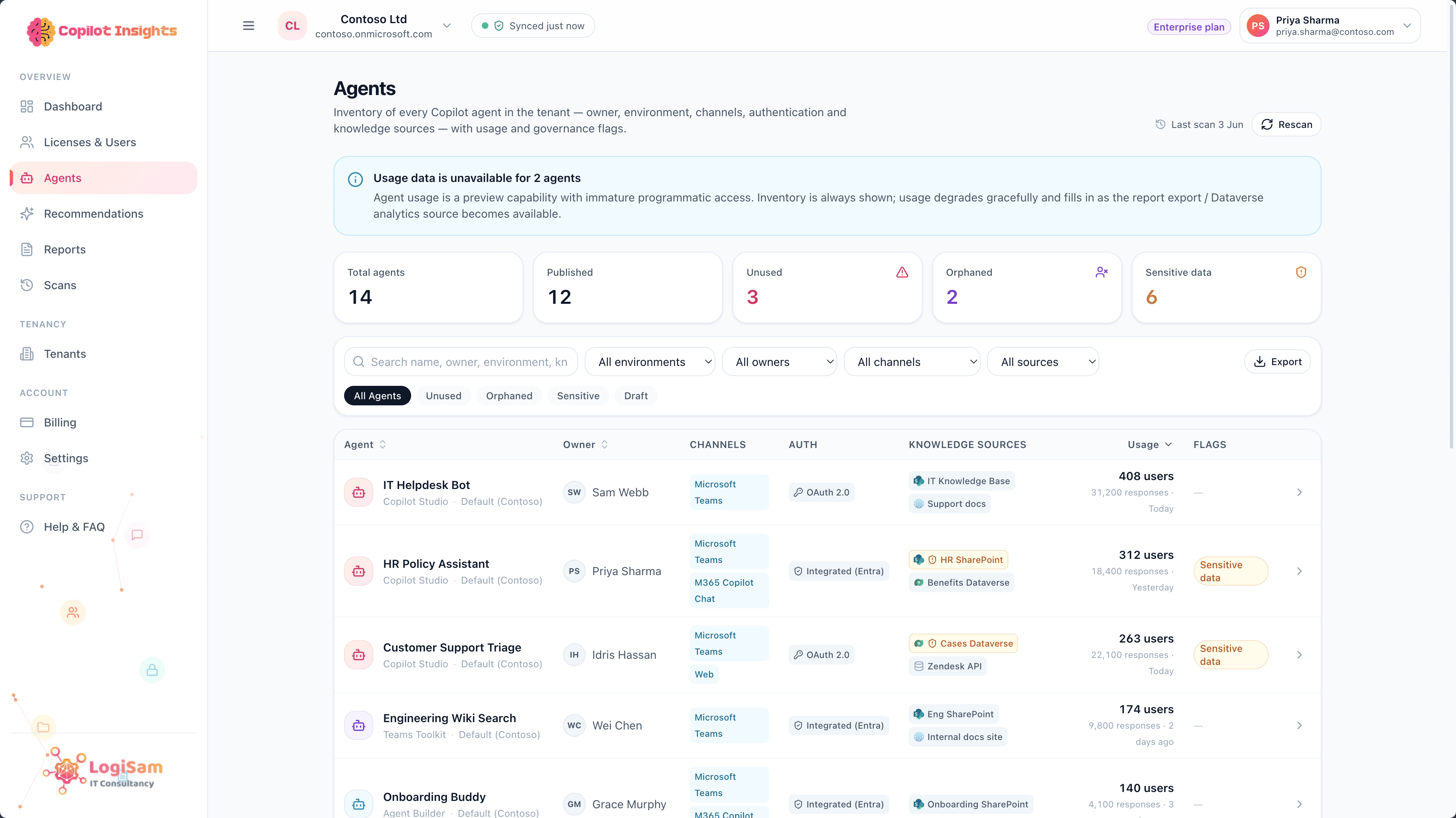
Agent governance
A live inventory of every Copilot Studio agent — owners, status and risk flags — so nothing runs unowned, unused or ungoverned.
Recommendations
A prioritised, plain-English list of what to do next — reclaim these seats, review this agent — each tied to the numbers behind it.
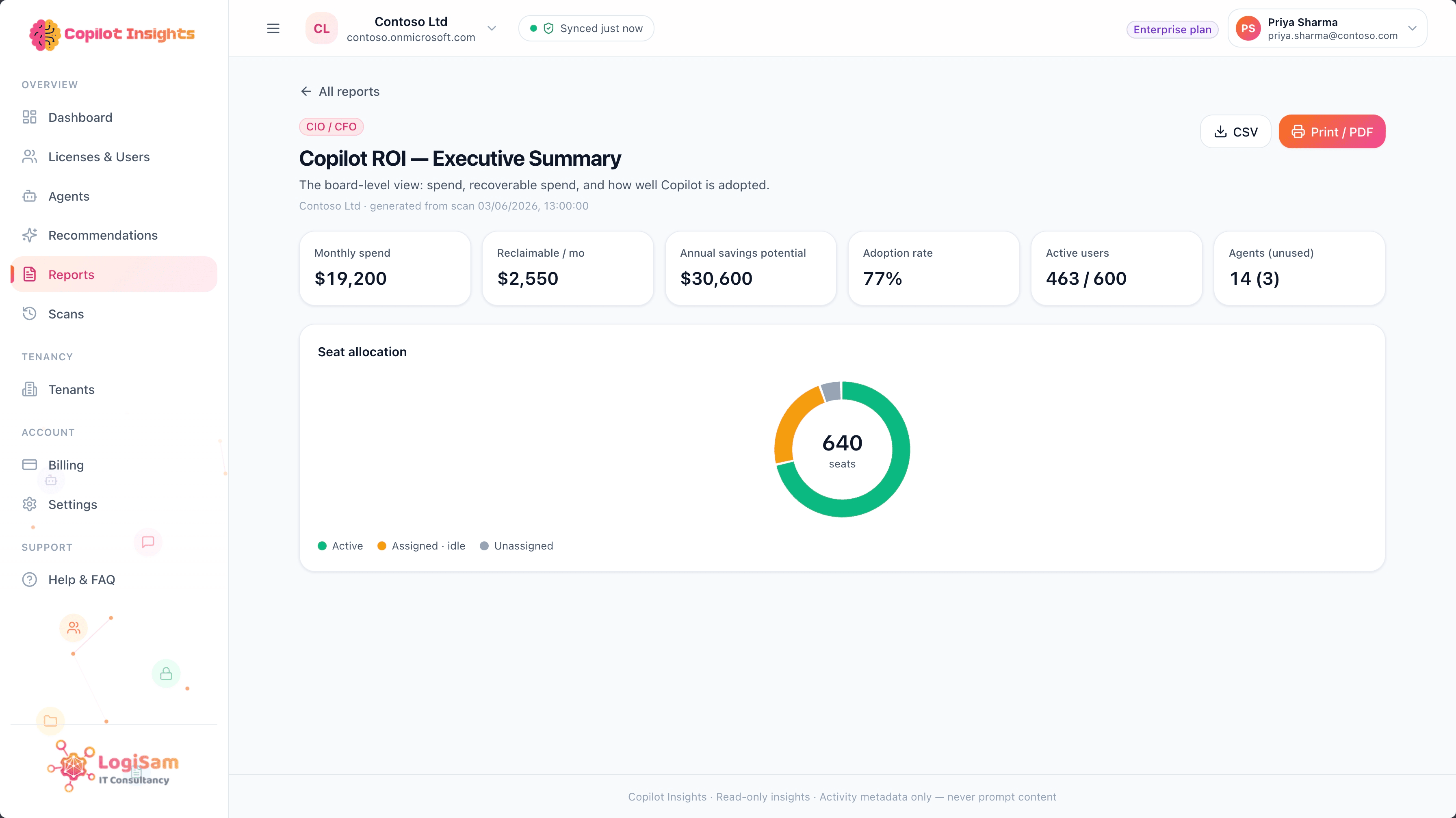
Reports & exports
Board-ready reports for finance, IT and security — exportable to CSV and PDF, with scheduled email ROI digests to keep stakeholders in the loop.
Scans
Run a read-only scan whenever you need a fresh picture, and compare snapshots over time to show progress at renewal.
It only reads. It never writes, changes, or touches your files.
Copilot Insights connects with read-only Microsoft Graph consent and looks at activity metadata only — so your security team can sign off in a day, not a quarter.
Read-only
Connects with read-only consent. It can observe your estate, but never write to your tenant.
No changes
It can't reassign licences, alter or delete agents, or change a single setting — ever.
Never your content
It never reads prompts, chats, emails or documents. Activity metadata only.
You stay in control
Revoke access from Microsoft Entra anytime, and delete your data whenever you want.
Built for the people who own Copilot
From the CFO's renewal question to the security team's agent audit, Copilot Insights gives every stakeholder the same source of truth.
IT & FinOps
Cut Microsoft 365 Copilot waste at renewal. Turn licence data into a clear reclaim number and a defensible budget.
IT administrators
One dashboard for adoption, seat assignment and recommendations — no spreadsheets, no manual Graph queries.
Security & governance
Discover shadow agents, orphaned ownership and agents touching sensitive data before they become an incident.
MSPs & partners
Run ROI and agent-governance reviews across many client tenants, and turn them into a recurring managed service.
Teams that put Copilot to work
What IT, finance and security leaders say after their first Copilot Insights scan.
“We found nearly £4,000 a month in Copilot licences nobody was using. Copilot Insights paid for itself in the first week.”
“Finally a single view of every Copilot Studio agent in our tenant — including the ones no one remembered building or owned.”
“Read-only and metadata-only was exactly what our security team needed. Sign-off took a day instead of a quarter.”
Answers for security, IT & procurement
The questions we're asked most in evaluations — on privacy, data and hosting.
Does Copilot Insights read our users' Copilot prompts or documents?
No. Copilot Insights reads activity metadata and inventory only — licence assignment, usage signals and the list of agents. The content of prompts, chats and files is never accessed or stored.
What data does Copilot Insights store about our users?
Only what your report needs: user-level licence and usage metadata (name, sign-in name, licence assignment and activity signals) captured in each scan, plus the accounts of people who sign in. Never prompt, chat or file content — and user names can be anonymised.
Can we host Copilot Insights inside our own Azure subscription?
Yes. Copilot Insights is a standard Azure application (App Service + Azure SQL), so on Enterprise and Partner plans it can be deployed entirely within your own Azure tenant — all data stays under your governance, in your subscription and region.
How does it connect to Microsoft 365, and can it change anything?
Through standard, read-only Microsoft Graph consent. Copilot Insights can only observe — it never writes to your tenant, so it cannot reassign licences, alter agents or change any setting.
What permissions does it need?
Read-only Microsoft Graph scopes for licence and usage reporting, plus directory read to inventory Copilot Studio agents. No write permissions, ever — and you can revoke access from Microsoft Entra at any time.
Is our data isolated from other customers?
Yes. Every query is scoped to a single tenant, so one customer's data is never visible to another. Self-hosting isolates it entirely within your own subscription.
Can we try it on our own tenant before buying?
Yes. The Free plan runs one full, read-only ROI scan on your real Microsoft 365 tenant — no card required — so you see the value on your own data first.
Can we delete our data whenever we want?
Yes. You can delete your organisation and all its scan data at any time, and disconnecting revokes Copilot Insights's access to your tenant immediately.
More questions? See the full FAQ in the user manual.
Talk to the Copilot Insights team
Questions about your Copilot estate, a multi-tenant rollout, or partner pricing? Send us a note and we'll come back to you.
Prefer a walkthrough? Open the live demo — no sign-up needed.
Read-only, activity-metadata only. We never read prompt content.
Run your first scan free — connect your tenant in minutes.
Get in touch with LogiSam
Tell us about your Copilot estate, a multi-tenant rollout or partner pricing, and we’ll come back to you.
Contact usReady to see your Copilot ROI?
Run a free, read-only scan of your Microsoft 365 tenant and get your reclaimable spend and agent inventory in minutes.